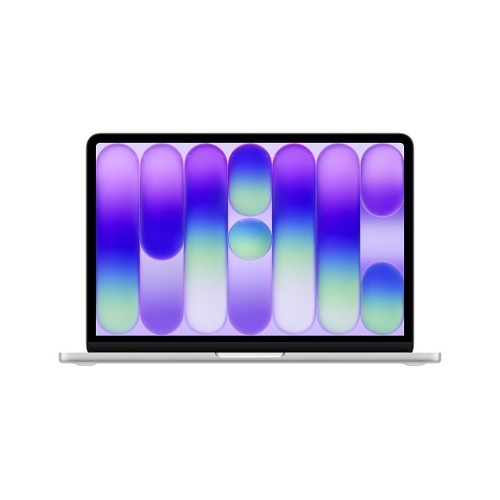
A colorful entry‑level Mac
Apple’s newest 13‑inch laptop arrives in four eye‑catching hues, Silver, Blush, Citrus and Indigo, each with a matching keyboard. The color‑coordinated design is a first for the MacBook line‑up and the aluminum chassis feels solid enough to survive the daily grind of student life and remote work.
Power where it counts
The surprise of the Neo is the A18 Pro silicon that powers the iPhone 16 Pro. Six CPU cores, five GPU cores and a 16‑core Neural Engine give the machine enough muscle for web browsing, video calls, spreadsheet crunching and even light video editing. AI‑driven features such as Apple Intelligence run on‑device, keeping data private while still offering the kind of assistance that has become standard on Apple’s higher‑end hardware.
Display, camera and sound
A 13‑inch Liquid Retina panel (2408 × 1506, 500 nits, P3) outshines most Windows rivals in the same price bracket. The 1080p FaceTime HD camera, dual‑mic array and side‑firing stereo speakers with Spatial Audio make remote meetings feel less like a compromise and more like a natural conversation.
The price‑performance sweet spot
At $599 (U.S.) for the base 256GB model and $899 for the 512GB version, the Neo undercuts every other Mac in the market and still competes with premium Windows ultrabooks. The 8GB of unified memory is not upgradeable, but the architecture of Apple silicon makes the limited RAM feel less restrictive than it would on an Intel‑based laptop.
Compromises you can live with
- Ports: One USB‑C port that supports 10Gbps data and DisplayPort, a second USB‑C limited to USB 2.0 speeds and a 3.5mm headphone jack. No MagSafe, no Thunderbolt.
- Keyboard: The Magic Keyboard lacks backlighting, a noticeable omission for anyone who types in dim environments.
- Storage: 256GB or 512GB SSDs are the only options; the entry‑level model may feel cramped for heavy media libraries.
Battery life and charging quirks
Apple advertises up to 16 hours of video playback on a 36.5Wh battery. The included 20W USB‑C power brick tops out at roughly 18W of actual charging power. In testing by ChargerLAB, a 35W Dual USB‑C Port Compact Power Adapter, sold for $59, pushes the Neo to about 30W, shaving 20–30 minutes off a full charge. Higher‑wattage Apple chargers (96W, 140W) do not move the needle any further, making the 35W model the most cost‑effective Apple‑branded option. Quality third‑party Macbook chargers such as those available from JB HiFi, Harvey Norman, Jaycar, Campad Electronics and Vodafone stores can achieve similar results at a lower price.
Who should consider the Neo
Students, educators and casual users who need a reliable, portable Mac without the premium price tag will find the Neo compelling. Its performance is more than adequate for everyday tasks and the vibrant display and solid build give it a feel that belies the price. Power users who demand multiple high‑speed ports, a backlit keyboard or expansive storage will still need to look higher up the MacBook line.
Bottom line
Apple has finally offered a truly entry‑level Mac that doesn’t feel like a stripped‑down version of its flagship models. By pairing the A18 Pro chip with a premium aluminum chassis and a bright Retina screen, the MacBook Neo delivers a Mac experience at a price that competes directly with Windows alternatives. The trade‑offs, limited ports, no keyboard backlight, modest storage, are clear, but for its target audience they are acceptable compromises.
The Neo may well be the most successful launch week in Apple’s history and it could signal a shift toward more affordable Macs without sacrificing the brand’s core strengths.
MacBook Neo FAQs
What chip powers the Neo and how does it compare to the M‑series?
The Neo runs Apple’s A18 Pro silicon, the same SoC that drives the iPhone 16 Pro. It’s a 6‑core CPU (2 performance, 4 efficiency), a 5‑core GPU and a 16‑core Neural Engine. In raw single‑thread performance it sits just a notch below the entry‑level M2, but the tighter integration with iOS‑grade power management lets it punch above its price point for web browsing, video calls and light editing.
Is the 8GB of unified memory a bottleneck?
On paper 8GB sounds modest, but Apple’s unified architecture means the CPU, GPU and Neural Engine share the same pool. Real‑world benchmarks show the Neo handling multiple browser tabs, Office suites and even 1080p video transcoding without swapping. Heavy multitasking or large‑scale AI workloads will feel the ceiling, but for its target segment the memory is adequate.
What are the port options and why are they limited?
The Neo ships with two USB‑C connectors and a 3.5 mm jack. The primary USB‑C supports 10Gbps data and DisplayPort; the secondary is limited to USB 2.0 speeds and lacks power delivery. Apple omitted Thunderbolt, MagSafe and any legacy ports to keep the chassis thin and the bill of materials low, a trade‑off that mirrors the design philosophy of the iPhone 16 Pro.
Why doesn’t the Magic Keyboard have backlighting?
Backlighting adds cost and power draw. Apple judged that the Neo’s price‑sensitivity and the fact that most students will be using it in well‑lit environments outweighed the benefit of a lit keyboard. The tactile feel of the scissor‑mechanism remains, but users will need an external light source in dim settings.
How does the battery life claim hold up in everyday use?
Apple rates the Neo at up to 16 hours of video playback on a 36.5Wh cell. Real‑world tests with mixed web browsing, video calls and document work average 12–13 hours. The included 20W charger tops out at roughly 18W charge rate; a 35W Apple‑branded adapter cuts the full‑charge time by 20–30 minutes. Higher‑wattage chargers don’t accelerate charging because the Neo’s charge controller caps input at ~30W.
Can I upgrade storage or memory after purchase?
No. The SSD is soldered and the unified memory is integrated into the A18 Pro package. Buyers must choose between 256GB and 512GB at checkout. For most students this is sufficient, but power users with large media libraries will need external drives or cloud storage.
Does the Neo support external displays?
Yes. The primary USB‑C port can drive a single external monitor up to 4K @ 60 Hz via DisplayPort Alt Mode. The secondary USB‑C port cannot output video.
How does the Neo’s display stack up against Windows ultrabooks?
The 13‑inch Liquid Retina panel (2408 × 1506, 500 nits, P3 color gamut) offers higher brightness and a wider color space than most budget Windows laptops, which typically sit at 300–350 nits and sRGB coverage. The OLED‑like contrast and True Tone calibration give it a noticeable edge in color‑critical work.
Is the Neo a viable option for developers?
For web development, scripting and light container work, the A18 Pro’s performance is sufficient. However, the lack of Thunderbolt, limited port bandwidth and 8 GB RAM can make running multiple VMs or heavy compile jobs cumbersome. Developers targeting iOS/macOS will appreciate the native toolchain, but those needing x86 compatibility may need a higher‑tier Mac.
What’s the warranty and service outlook?
Apple provides a standard one‑year limited warranty and up to 90 days of complimentary technical support. AppleCare+ can be added for an additional $149, extending coverage to two years and adding accidental damage protection.
How does the Neo’s price position it against Windows competitors?
At $599 for the base model, the Neo undercuts most Windows ultrabooks that cost $800‑$1,200 while delivering a premium aluminum chassis, a Retina display and the macOS ecosystem. The trade‑offs, fewer ports, no backlit keyboard, limited storage, are comparable to what Windows manufacturers charge for similar compromises.
Will the Neo receive the same macOS updates as higher‑end Macs?
Yes. Apple’s support policy ties updates to the silicon generation, not the product tier. The A18 Pro will continue to receive macOS releases for at least five years, ensuring security patches and new features long after the device’s launch.